
A dkim=fail in an email's headers means the receiving server couldn't verify that message's signature, even when a DNS checker says your key is fine. Each reason a receiver writes beside the result has its own cause and fix, and you'll find them below under that exact text.
- Open the original headers of a message that failed. In Gmail, open the message, click More next to Reply, then Show original. Google's header instructions cover Outlook, Apple Mail and Yahoo Mail too.
- Find the
Authentication-Resultsheader your receiving server added. Copy thedkim=result and the reason in brackets after it. A sender can insert a header with the same name, so use the one your own mail system wrote. - Find
d=ands=in the matchingDKIM-Signatureheader.d=is the signing domain ands=is the selector. The receiver looked for the public key ats=, then._domainkey., thend=. - Look up the reason in the table below, then read its section.
You can also paste the headers into the free email header analyzer. It shows each DKIM result with its signing domain and selector, and whether that domain matches the From address. It leaves out the reason in brackets, so read that line in the header yourself.
If you've only got a DMARC report, go to DKIM failures in aggregate reports. You'll need a received message to find out why a particular signature failed.
DKIM results and errors
| What you see | What it means |
|---|---|
dkim=none or dkim=none (message not signed) | The message had no signature to check. Turn on signing in the service that sent it. |
no key for signature | No key was published at the selector's DNS name. Check the exact name. |
key revoked or key syntax error | A record exists at that name, but its key is empty or unreadable. Check the record. |
dkim=temperror | The key lookup failed for a moment, such as a DNS timeout. Check your name servers and send a fresh test. |
signature did not verify | A signed header changed, or the key in DNS isn't the one that signed. Compare the key and the mail route. |
An rsa-sha1 signature or a key under 1024 bits | The signature uses an algorithm or key size receivers no longer accept. Replace the key. |
body hash did not verify | The body changed after it was signed. Find the service that changed it. |
dkim=pass with dmarc=fail | The signature passed for a domain that doesn't match the From address. Check alignment. |
The reasons in brackets come from section 6.1 of RFC 6376, the DKIM standard, which lists the failures a verifier returns. The result names come from section 2.7.1 of RFC 8601: none, pass, fail, policy, neutral, temperror and permerror. Under RFC 8601, a receiver can report a signature it couldn't process as neutral or permerror instead of fail. So the same reason can follow different result names. Search for the reason, and keep the whole line when you ask your provider for help.
dkim=none (message not signed)
The message arrived with no DKIM signature, so the receiver had nothing to verify. A published key signs nothing by itself. You turn on signing in each service that sends mail as your domain.
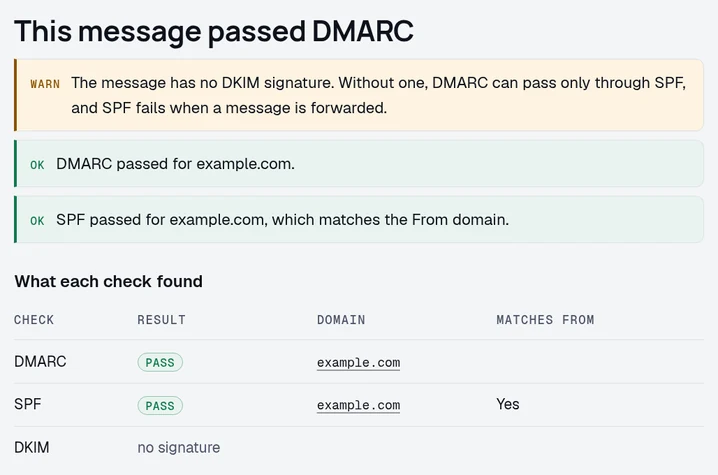
Google Workspace: in the Admin console, go to Menu > Apps > Google Workspace > Gmail and click Authenticate email. Choose the domain and click Generate new record. Publish the TXT record at the name shown, which is google._domainkey unless you chose another prefix, then come back and click Start authentication. Google's DKIM setup page says it can take up to 48 hours to start working.
Microsoft 365: in the Defender portal, go to Email & collaboration > Policies & rules > Threat policies > Email authentication settings and open the DKIM tab. For a domain with no DKIM keys yet, try to turn on its toggle. The first try fails with an error, and the domain's details then list two CNAME records under Publish CNAMEs. Publish both, wait for Microsoft to find them, then turn on Sign messages for this domain with DKIM signatures. Microsoft's DKIM instructions say domains added from May 2025 get targets ending in dkim.mail.microsoft, and older domains keep targets under onmicrosoft.com. Copy the values from your own tenant. Microsoft says the values in its examples are for illustration only.
A helpdesk, invoice app or marketing service: check that service's domain authentication settings. Signing your staff email doesn't configure your invoice app. Our provider setup pages cover the individual services.
no key for signature
The receiver looked for a public key at the selector's DNS name and found no record. Section 6.1.2 of RFC 6376 calls this no key for signature and treats it as a permanent failure. An empty p= gives key revoked, and a record that can't be read gives key syntax error.
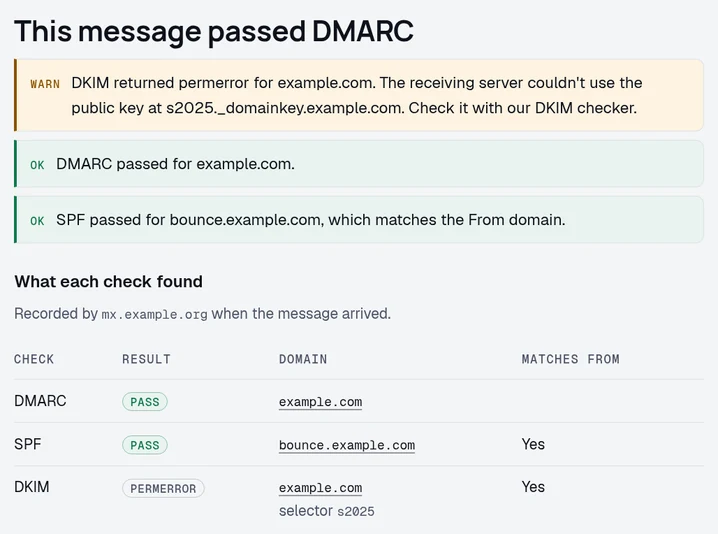
Build the lookup name from s=, then ._domainkey., then d=. Copy both values from the same signature, since the From address can use a different domain. In Google Admin Toolbox Dig, choose TXT and enter that full name. If you've got dig installed, run these commands with the uppercase placeholders replaced:
If the answer is a CNAME, as it is for Microsoft 365, the key sits in a TXT record at its target. A CNAME can't share its name with any other record (RFC 1034, section 3.6.2). Delete any TXT record at the selector name before you add the CNAME.
Then enter the same domain and selector in our DKIM checker. A valid key under another selector proves nothing about this message, because the receiver looks up only the selector in its signature.
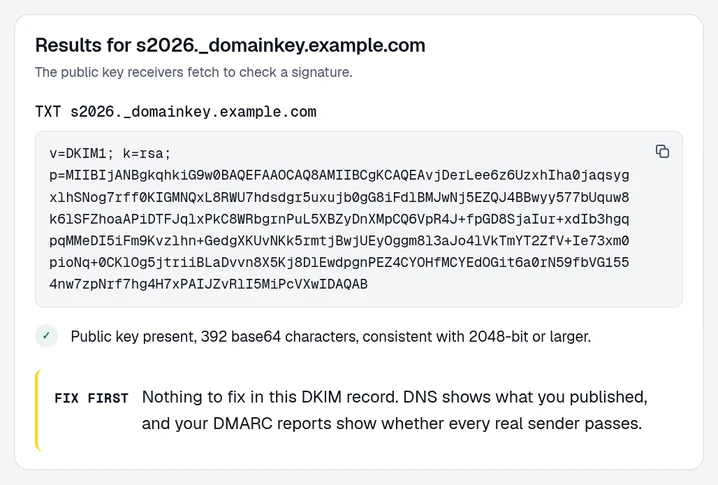
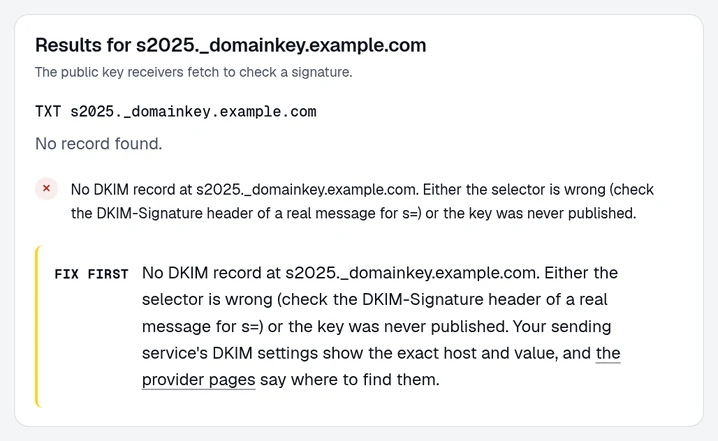
What the lookup returns
- No record. Publish the key your sending service shows you, at exactly that name.
- A record with an empty
p=. RFC 6376 section 3.6.1 says an empty value means the key was revoked. Publish the active key's record from your sending service. - A key split across several quoted strings. Those strings join with no spaces between them (RFC 6376 section 3.6.2.2). Google's DKIM troubleshooting says a 2048-bit key doesn't fit in a single 255-character string, so split it into strings inside one record.
- Two TXT records at one selector. The same RFC section gives no defined result for that case. Keep only the key you sign with.
dkim=temperror. The lookup timed out or the name server returned an error. Check that each of your name servers answers for the selector, then send a fresh test.
signature did not verify
The receiver found a key, but the signature didn't verify against the signed headers. Section 6.1.3 of RFC 6376 returns signature did not verify for this. Either a signed header changed after signing, or the key in DNS isn't the one that signed.
If the DNS key matches your provider's instructions, ask the provider which key the failing server signs with. Give them the original message, the time it was sent, the domain and the selector. If failures come and go, send a passing sample too.
Check for a key rotation or DNS change around the first failure. Section 3.1 of RFC 6376 describes rotation as publishing both keys while mail signed with the old one is in transit, then removing the old key. Microsoft 365 rotates between its two selectors, and its DKIM instructions say a new key takes four days to start signing. Keep both CNAME records in place.
Also check the servers between signing and delivery. A relay that rewrites a signed Subject or From header breaks the signature. Microsoft's authentication troubleshooting lists a key that doesn't match the signing key, or a missing selector record, as the cause of a failed signature check.
rsa-sha1 signatures and short keys
Section 3.1 of RFC 8301 says signers must use rsa-sha256, and rsa-sha1 must not be used for signing or verifying. Section 3.2 requires RSA keys of at least 1024 bits and recommends at least 2048. A signature that breaks either rule counts as a permanent failure. Google's sender guidelines require a key of 1024 bits or longer for mail to personal Gmail accounts, and recommend 2048.
Our DKIM checker warns when the key's length looks like 1024 bits. To replace a key, generate a 2048-bit one in your sending service and publish it under a new selector. Switch signing to it, then remove the old key once mail signed with it has been delivered.
RFC 8463 adds Ed25519 keys, which verifiers must support. Its section 6 describes signing each message twice during the change, with an RSA key and an Ed25519 key under different selectors.
body hash did not verify
The receiver found the key, but the hash of the body it received doesn't match the bh= value in the signature (RFC 6376 section 6.1.3). A server on the route changed the body after the message was signed. Microsoft's header reference shows it as dkim=fail (body hash did not verify).
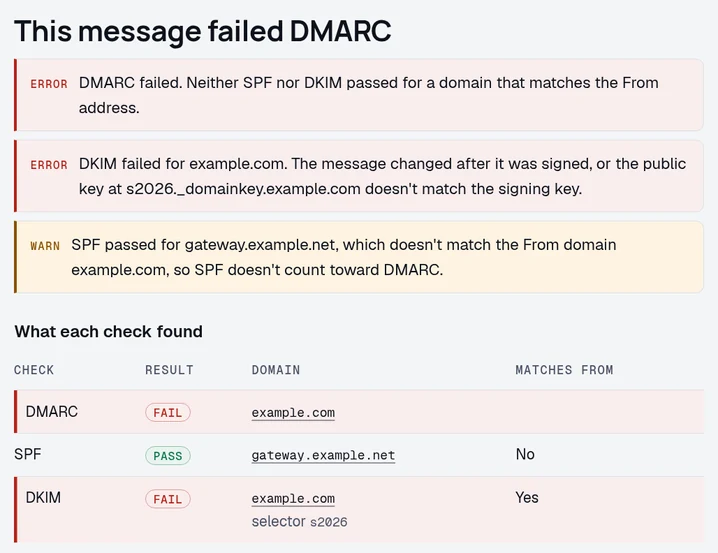
Google's DKIM troubleshooting names outbound gateways that add a footer to every message. Microsoft lists mailing lists, transport rules and security services that add a disclaimer or scan notice.
To find the step that changes the body, send one test straight to an outside mailbox you control and another along the route that fails. If only the second fails, the change happens on that route.
For a gateway you run, stop it editing outbound mail, or have it sign with your domain after its edits. For a recipient's forwarder or mailing list, ask its administrator. With ARC, a forwarder records the results it saw before its change, and the final receiver decides whether to trust them. The original signature still fails. The body hash error page lists more causes and how to test each.
DKIM pass with DMARC fail
DMARC passes only when SPF or DKIM passes for a domain that matches the From address. That match is called alignment. Section 4.4.1 of RFC 9989 says a signature from any other domain doesn't count, because anyone can sign mail with a domain they own.
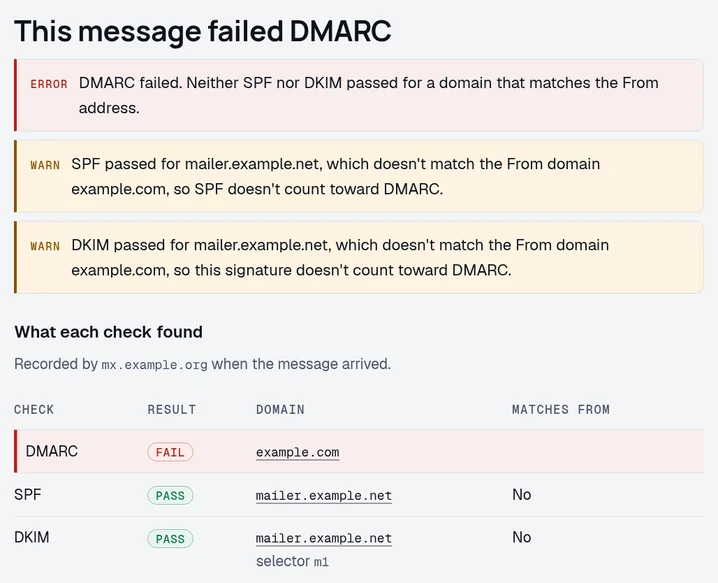
A sending service that signs only with its own domain gives this result. Turn on custom domain signing in that service and publish the record it gives you. Under relaxed alignment, a signature for mail.example.com aligns with example.com. Our DMARC alignment guide covers strict and relaxed modes.
A message can carry several signatures, and the same RFC section says it passes DMARC if any one of them both verifies and aligns. A failed signature for your own domain beside a passing signature for a service's domain still fails DMARC, unless SPF passes for your domain. Read every dkim= result before you decide what failed. Google's DKIM troubleshooting says Gmail checks only the first 5 signatures.
DKIM fail with SPF pass
When DKIM fails and SPF passes for the From domain, the message passes DMARC (RFC 9989 section 5.3.5). A copy forwarded through a server that isn't in your SPF record fails SPF, which Microsoft notes is common. With the signature also failing, that copy fails DMARC. Google's sender guidelines also ask anyone sending more than 5,000 messages a day to Gmail accounts to set up both SPF and DKIM.
DKIM failures in aggregate reports
In an aggregate report, auth_results holds a dkim entry for each signature, with its domain, selector and result. Some reporters add a human_result with more detail. The dkim value under policy_evaluated is the alignment result. A pass in the first and a fail in the second means the signature passed but didn't align (RFC 9990, sections 3.1.1.9 to 3.1.1.12).
Reports hold counts and authentication results per source, without the messages themselves. They show you which source fails. To learn why its signature failed, you need a message from that source or the provider's logs.
Read the XML yourself with our aggregate report walkthrough, or upload it to the free DMARC report analyzer. Compare the same source before and after your change.
Retesting after the fix
Only a fresh message shows whether the fix worked. Repeat the task that failed, such as sending another invoice from the invoice app or another reply from the helpdesk. A passing test from your staff mailbox tests only that mailbox's route.
Send to a recipient outside your own mail system. Internal delivery can skip the signing and verification you're trying to test.
Check the received message for a passing signature from the intended domain, then check DMARC. If you changed DNS, wait for old cached answers to expire. The result saved in yesterday's email won't update.
On a paid plan, we email you when a new source fails DMARC. That email goes out once the aggregate reports showing the source arrive, at most once a day per domain. On every plan, we email you when a DKIM key that signed your mail in the last three days disappears from DNS. A deleted key with no recent mail goes into the weekly digest instead. The digest also lists each new sender with its result. Your first domain is free.
Read the key a selector publishes for your domain
The record as receivers fetch it, with the key length and the faults marked.
Free · No signup · The result names what to change
Questions
What does dkim=fail mean?
The receiving server couldn't verify a DKIM signature on that message. The reason in brackets after the result says why, such as body hash did not verify or signature did not verify. A message with no signature shows dkim=none instead.
What does dkim fail no key for signature mean?
The receiving server looked up the selector named in the signature and found no key there. Build the name from s= and d= in the DKIM-Signature header, then publish the key your sending service gives you at exactly that name.
Why does a DKIM checker pass while my email fails?
A DNS checker reads the public key at the selector you typed. Your email can use another selector, come from a service that doesn't sign, or change after signing. Check the received message to find which happened.
Can DMARC pass when DKIM fails?
Yes. DMARC needs a pass for a domain that matches the From address, from SPF or from any DKIM signature. Read every result before deciding that the message failed DMARC.
How long does a DKIM fix take?
Retest with a fresh message after the change takes effect. After a DNS change, old cached answers also have to expire. The result stored in an old email won't update.
Keep reading
Checking as you go? The DMARC checker reads the policy you are moving up, the SPF and DKIM checkers show whether your senders will survive it, and the report analyzer reads an aggregate report you already have. No signup.
DomainCanary is a DMARC enforcement service that protects your domain from email spoofing without blocking your own mail.