
A DMARC aggregate report is the XML file a mail server sends to the address in your
DMARC record's rua= tag, usually once a day. This guide opens one, explains
each field, and shows how to tell your own mail, forwarded mail, an unauthenticated
platform and spoofing apart.
What an aggregate report is
DMARC is the DNS record where you publish a policy for mail that uses your domain in its
From address. Its rua= tag gives an address for reports:
Receivers, the mail servers at Gmail, Outlook and the rest, check incoming mail against that policy. Each receiver that got mail from your domain can send a report to that address, with a separate report for each of your domains. It counts messages by sending IP address and authentication result, and holds no subjects, recipients or message bodies.
Under RFC 9990, receivers send reports daily or more often, and a report typically covers a UTC day, midnight to midnight. Google says its reports usually arrive once a day, and that a domain can get "many reports each day, up to hundreds", depending on how much mail it sends and to how many domains.
Opening the file
A report arrives as an email attachment. Its name follows the pattern in RFC 9990 section 3.5.2. It holds the receiver's domain, your domain, the start and end of the reporting window as Unix timestamps, and the extension.
The standard allows .xml and .xml.gz. Some receivers send a
.zip instead. Decompress the file and format the XML:
Any text editor opens the XML if you don't have xmllint. Our free
DMARC report analyzer takes the file as it
arrived, .xml, .xml.gz or .zip, and shows each
source as a row in a table. It needs no account and doesn't store the file.
The structure of a report
Google, Microsoft and Yahoo send reports in the format from RFC 7489, the original DMARC standard. Here is a sample in that format, trimmed to the first record:
-
report_metadatasays which receiver sent the report and which window it covers. The dates are Unix timestamps in UTC. -
policy_publishedis the DMARC record the receiver found in your DNS. Check it here to confirm a change reached that receiver. -
Each
recordholds a sending IP address and the results for its messages. An address whose messages got different results has several records. Therowholds the address, the message count and the DMARC outcome, and itsauth_resultsholds the raw SPF and DKIM results.
Raw results and aligned results
In the record above, auth_results shows DKIM as pass, and
policy_evaluated shows DKIM as fail. Both are correct,
because they measure different things.
-
auth_resultsis the raw outcome. The signature verified forvendor.example, the domain in itsd=tag. -
policy_evaluatedis the outcome after alignment.vendor.exampleisn'texample.com, so this signature doesn't count for DMARC.
SPF passed for example.com, the domain in the From address, so SPF aligned
and the message passed DMARC. A message passes when SPF or DKIM passes for a domain that
aligns with the From domain
(RFC 9989, section 5.3.5).
Under relaxed alignment, the default (adkim=r, aspf=r), a
subdomain such as mail.example.com aligns with example.com.
The alignment guide covers strict mode.
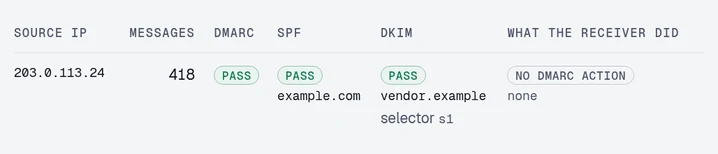
Read policy_evaluated to find out whether DMARC passed. Read
auth_results to find out which platform sent or signed the mail, and so
which one to fix. The analyzer shows the same row with the raw SPF and DKIM
results, each with the domain it was for, beside the DMARC outcome:
The fields in each record
| Field | What it tells you |
|---|---|
| source_ip | The server that connected. Your main clue to who the sender is. |
| count | Messages from that address with these exact results in the window. |
| disposition | The DMARC action the receiver took: none (no action), quarantine (treated as suspicious, often the spam folder) or reject (refused). RFC 9990 adds pass, no action for mail that passed DMARC under an enforcing policy. The receiver's other filters can still block or file the mail, and the count includes it either way. |
| reason | Present when the receiver didn't apply your policy, with a type such as local_policy or mailing_list. |
| header_from | The domain in the visible From address. A subdomain without its own DMARC record appears here, in your domain's report. |
| envelope_from | The envelope sender domain. It's optional under RFC 9990. |
| auth_results/dkim | The signing domain and selector. Often the platform's own domain, and the selector often points to the platform. |
| auth_results/spf | The envelope sender domain that SPF checked, often the platform's bounce domain. |
| policy_published | Your DMARC record as the receiver saw it during the window. |
RFC 7489 and RFC 9990 reports
RFC 9990 replaced the
reporting part of RFC 7489 in May 2026. A report in the RFC 9990 format carries a namespace
on its root element, and its policy_published block changes:
pctis absent, because RFC 9989, the DMARC standard that replaced RFC 7489, retired thepct=tag.testingis your record'st=tag. Witht=y, a receiver that follows RFC 9989 applies the level below your policy to failing mail. A row where it did so carries the reasonpolicy_test_mode.npis your policy for subdomains that don't exist.discovery_methodsays how the receiver found your record:psl, the RFC 7489 way, ortreewalk, the RFC 9989 way.generatoris the name and version of the software that wrote the report.dispositioncan bepass, as in the table above.
On 24 Oct 2026, DmarcDkim counted 210 of 5,204 report senders using the RFC 9990 format, 4.0%. The large mailbox providers among them were GMX, WEB.DE and mail.com. Google, Microsoft and Yahoo weren't on the list, and Microsoft's DMARC documentation still points to the RFC 7489 schema. So a report from Gmail, Outlook or Yahoo looks like the sample above.
Identifying the source
To find out who sends from an IP address, look up its reverse DNS and its owner:
The reverse DNS name usually includes the provider's domain. If it doesn't, check the
domains in auth_results. A platform that signs with its own domain puts
that domain in the DKIM result. Our DKIM checker looks up a selector
and domain from the report, to see whether that key is published.
Common patterns
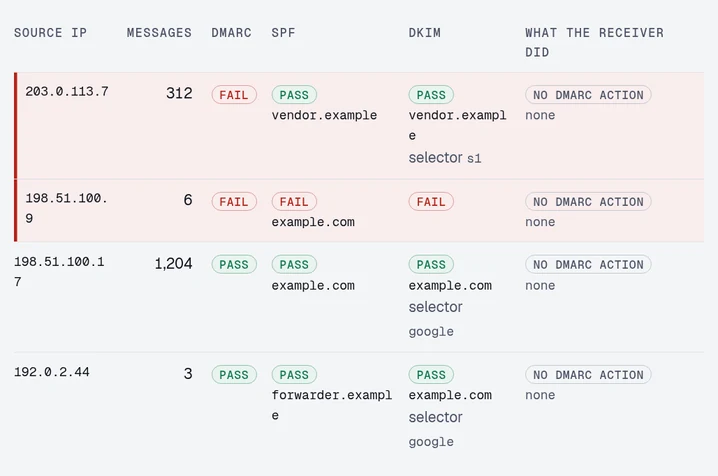
The analyzer's table below comes from a sample report with a source for each of four
patterns. The policy is p=none, so the receiver took no DMARC action on
any of the mail, and the analyzer's last column shows none on every row.
The analyzer lists failing sources first.
-
Your own mail. High counts, SPF and DKIM passing for your domain, and
DMARC passing. That's
198.51.100.17above. There's nothing to do. -
Forwarded mail. DKIM passes for your domain, and SPF fails alignment.
That's
192.0.2.44above, where SPF passed forforwarder.example. A recipient has a rule that forwards your mail to another mailbox. Your DKIM signature still verified after the forward, so DMARC passed and there's nothing to fix. Forwarding breaks SPF, and RFC 7960 says DKIM has to carry DMARC on forwarded mail. Without a DKIM signature for your domain, this mail would fail DMARC, and your policy would apply to it once you enforce. -
A platform sending as you without your domain. A steady count from
one address or range, DMARC failing, and the platform's own domain on both SPF and
DKIM in
auth_results. That's203.0.113.7above, withvendor.exampleon both. Fix these first, by setting the platform up to sign with your domain. Our provider pages list the records for each platform. -
Spoofing. Small counts, no DKIM signature, SPF failing for your
domain, and an address you can't tie to any platform you use. That's
198.51.100.9above. You can't fix the sender. Moving your policy top=rejectis what stops this mail.
By hand and with DomainCanary
Reading by hand works for your first few reports. Paste a report into the report analyzer to get the table above.
To read every report, send them to us. We read each one as it arrives and email you a summary every Monday with your pass rate and any new sources. On the paid plans, we also email you when reports show a new source failing DMARC or a known sender that stopped passing. We send these alerts after the reports arrive, at most once a day per domain. Send your reports to us, and your first domain is free.
Have a report open? Paste it.
The analyzer turns the XML into the table this guide walked through: each source, its volume, and whether it passed.
Paste a reportFree · No signup · The result names what to change
Questions
Why does my report show SPF passing and DMARC failing for the same message?
The auth_results block holds the raw SPF result, and the policy_evaluated block holds the result after alignment. A pass in the first and a fail in the second means SPF passed for a domain that is not the one in your From address.
What is the rua tag in a DMARC record?
rua= is the address that receivers send aggregate reports to, as in rua=mailto:dmarc@example.com. Without rua=, receivers send you no aggregate reports. When the address is at a different registered domain, as in reports for example.com sent to reports.example.net, that domain has to publish a record agreeing to take them (RFC 9990, section 4). An address at your own registered domain needs none, so news.example.com can send its reports to an address at example.com.
Do aggregate reports contain message content?
No. They count messages by sending IP address and authentication result, with no subjects, recipients or bodies. Failure reports, which you ask for with a ruf= tag, can carry message detail. Gmail doesn't support ruf=, and Microsoft 365 doesn't send failure reports.
How often do DMARC reports arrive?
Usually daily from each receiver, each report covering a UTC day. Under RFC 9990, reports come daily or more often, and Google and Microsoft both say their reports arrive about once a day. A receiver sends no report for a day when it got no mail from your domain, so a source missing from one report may have sent nothing to that receiver that day.
Keep reading
Checking as you go? The DMARC checker reads the policy you are moving up, the SPF and DKIM checkers show whether your senders will survive it, and the report analyzer reads an aggregate report you already have. No signup.
DomainCanary is a DMARC enforcement service that protects your domain from email spoofing without blocking your own mail.