
Getting to p=reject without blocking your own invoices takes weeks, because
you first have to find out who sends mail as you. This guide gives the record to publish
at each step and the checks I run before each move.
- List everything that sends mail as you.
- Publish a
p=nonerecord with a report mailbox. - Read two weeks of reports.
- Fix the senders that fail.
- Move to
p=quarantine, on part of your failing mail first. - Move to
p=reject, on part of your failing mail first.
Step 1: your list of senders
Before you change any DNS records, write down everything that sends mail as you. Ask finance what sends invoices, ask marketing which platform they use, and ask whoever runs your monitoring. You'll miss some senders, and the reports will show them. Each sender on your list is one you won't have to trace from an IP address later.
Check for your mailbox provider, a marketing platform, a transactional email service, a helpdesk, a CRM, an HR or payroll system, and any monitoring or alerting tool. Our SPF setup pages for each provider cover the common ones.
Step 2: the p=none record
Publish a TXT record at _dmarc.example.com with this value, putting your
report mailbox in rua=:
Our DMARC record generator builds a record like this with your own address:
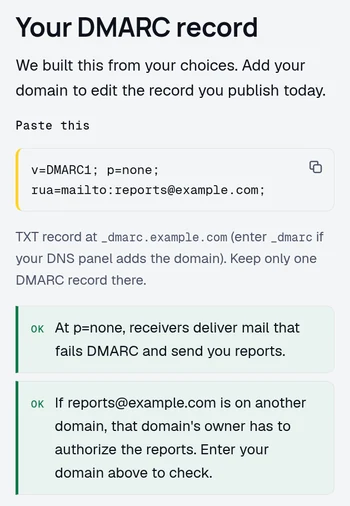
At p=none, receivers take no DMARC action on mail that fails. By receivers I
mean the mail servers at Gmail, Outlook and the rest. They start sending reports to your
report mailbox about the mail that uses your domain in its From line.
If your DNS panel adds your domain to every name, enter just _dmarc. If it
doesn't, enter _dmarc.example.com. Get that wrong and you publish
_dmarc.example.com.example.com, a name receivers never look up.
Once the record is live, look it up:
You should get back exactly one string, starting v=DMARC1. If you publish two
DMARC records, receivers discard both, and your domain has no DMARC policy. Our
DMARC checker reads every tag back to you:
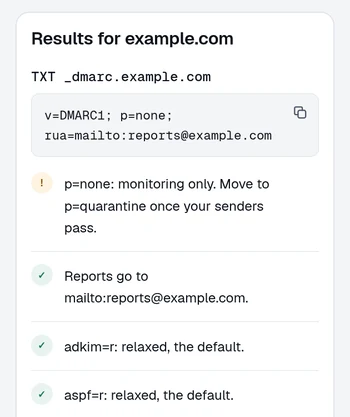
Your report mailbox gets a lot of mail. Google says a domain can get
"many reports each day, up to hundreds",
each one an XML attachment. If you won't read those every week, point rua=
at our weekly digest. It reads the reports and mails
you one summary, and your first domain is free.
Step 3: two weeks of reports
Read the reports for at least two full weeks, long enough for weekly jobs to show up. Note which of your senders run once a month, such as payroll or invoicing, and check that each one has run before you move on.
Make a table with a row for each sending source, saying what it is and whether SPF and DKIM align. Our DMARC report analyzer lists each source in a report file:
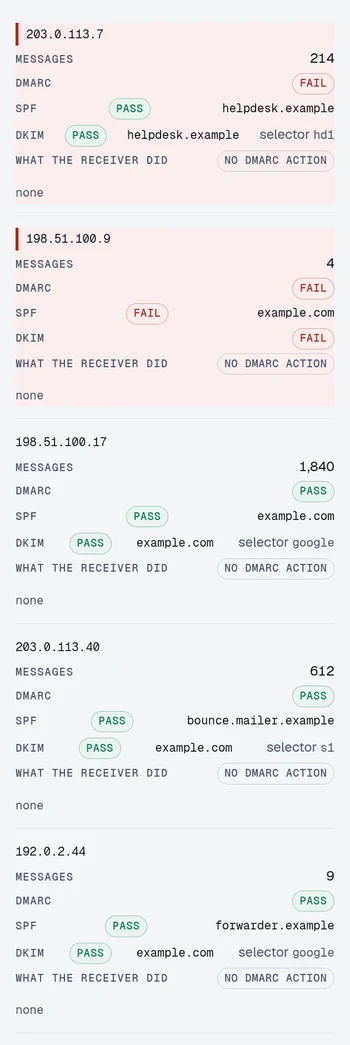
The two biggest sources, 1,840 and 612 messages, are your mailbox provider and your marketing platform. Both pass because they sign with your domain. The 9 forwarded messages at the bottom pass too, because your DKIM signature survived the forward.
The helpdesk at the top passes SPF and DKIM for its own domain and still fails DMARC, because DMARC needs a passing check for your From domain. The 4 messages that fail every check are someone spoofing you.
Reading a DMARC aggregate report covers the XML field by field, and DMARC alignment covers why a passing check can still fail DMARC.
Step 4: fixing the senders
Sort each source that fails into one of these cases.
- It is a service you use and it supports domain authentication. Turn it on. The service's setup page lists DNS records for you to publish, often CNAMEs.
- It is a service you use and it does not. That's a reason to change supplier. Until then, some of these services let you use your own domain for bounces, often called a custom return-path, which gets you SPF alignment. You can also route their mail through your own server.
- It is forwarding. Recipients forwarding your mail elsewhere show up as SPF failures with DKIM passing for your domain. If your signature survives the forward, DMARC passes, and there is nothing to fix. That's the best reason I know to sign everything with DKIM.
- It belongs to someone else. Someone is spoofing your domain. There's nothing to fix, and stopping it is the reason you're doing this.
Work down the list from the source that sent the most mail.
Step 5: p=quarantine
I use my own thresholds to decide when a domain is ready, and I move it to quarantine only when all of these are true:
- More than 98% of your mail passes DMARC, two weeks running.
- You can identify every source above 1% of your mail, and each one passes.
- No unidentified source has appeared in the last seven days.
- The monthly senders have run at least once inside those two weeks.
Then publish quarantine for 25% of your failing mail:
Gmail, Outlook and Yahoo follow RFC 7489, the older DMARC standard. With
pct=25, receivers on RFC 7489 quarantine about 25% of failing mail and treat
the rest as under p=none. Google recommends pct during a rollout
on its DMARC setup page,
and Microsoft suggests raising it gradually on its
Microsoft 365 DMARC page.
RFC 9989, the newer standard
that replaced RFC 7489 in May 2026, has no pct. A receiver that follows it
reads t=y instead and applies the policy one level down, which is
p=none here. Receivers on RFC 7489 ignore t=y.
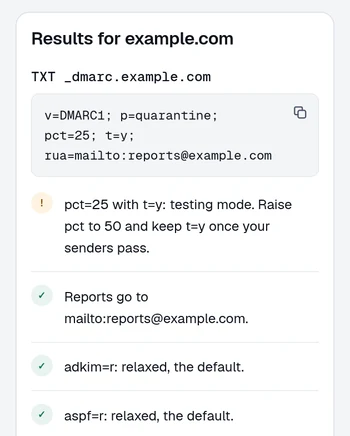
After three days of reports with none of your own mail failing, raise pct to
50. After three more, remove pct and t=y together, which leaves
p=quarantine applying to all failing mail. If your own mail starts failing
at any step, put the previous record back.
RFC 9989 says
receivers usually didn't apply pct accurately. Plan as if every receiver
quarantines all of your failing mail from the first day. If you aren't ready for that,
you aren't ready to leave p=none.
Stay at full quarantine for two weeks, and watch the reports and your helpdesk. Listen for somebody saying a partner stopped receiving something. Quarantined mail goes to spam, where a person can still find it. Rejected mail never arrives.
Step 6: p=reject
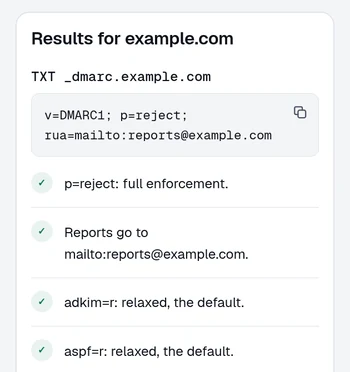
Before reject, I run the same checks with tighter numbers. I want 99% or more of your mail passing DMARC for two weeks at full quarantine, and no unexplained failures at all in the last week. Then publish reject for 25% of failing mail:
Receivers on RFC 7489 reject about 25% of failing mail and quarantine the rest. Receivers
on RFC 9989 read t=y and quarantine all of it. Raise pct to 50
after three days, and after three more, remove pct and t=y:
If your domain shows a BIMI logo, Google's
DMARC setup page
says BIMI doesn't work while pct is under 100, so your logo disappears during
these steps.
Keep rua=. At reject, receivers refuse mail that fails and send the bounce
to the service that sent it. The reports are the only place you'll see that mail.
Subdomains
Your policy applies to subdomains unless you say otherwise with sp=. Once you
move the parent to p=reject, receivers refuse mail from a marketing platform
on news.example.com that somebody set up before you started.
You can publish a separate DMARC record on the subdomain with its own policy, which is
precise and easy to see. Or you can set sp=none on the parent while you sort
it out. sp=none leaves every subdomain unprotected, so give it an end date.
Don't weaken the parent's own policy to make room for a subdomain.
If you never send from subdomains, publish sp=reject on the parent early, and
keep it in every record you publish from the steps above.
Receivers then refuse mail from a subdomain someone invents, such as
accounts.example.com. It costs you nothing as long as nothing legitimate
sends from a subdomain.
RFC 9989 added np=, a policy for subdomains that don't exist in DNS.
Receivers on RFC 7489 ignore it. It also never applies on a zone where every name looks
like it exists. A wildcard record does that. So does a DNSSEC-signed zone at Cloudflare
or Route 53, because both answer a lookup for a made-up name as if it exists. If you never
send from subdomains, sp=reject covers made-up ones too. Our DMARC checker
warns when np= can't apply to your zone.
Policy comparison
| Policy | Receiver does | Failing mail | Move on when |
|---|---|---|---|
| p=none | Delivers, reports | Arrives normally | 98% passing, 2 weeks, all big senders known |
| p=quarantine | Delivers to spam | Recoverable by the recipient | 99% passing, 2 weeks, nothing unexplained |
| p=reject | Refuses at SMTP | Gone, sender gets a bounce | You are done |
Common mistakes during the rollout
- SPF fails past ten lookups. The record looks fine, but a sender that receivers need an eleventh lookup to find gets permerror. DMARC then has only DKIM for that sender's mail, so a source that relies on SPF starts failing. The SPF 10-lookup guide has the fix.
-
Strict alignment set by accident.
adkim=sandaspf=slook like the responsible choice and break every sender that signs mail or takes bounces at a subdomain, such asbounce.example.com. Leave them off unless you have a specific reason. - The unread report mailbox. Reports sent to a distribution list that everyone has filtered into a folder go unread.
- Stopping at quarantine. If you stay at quarantine, spoofed mail still lands in spam folders, where people can open it.
Gmail and Yahoo bulk sender rules
Google requires anyone sending
more than 5,000 messages a day
to Gmail accounts to publish a DMARC record and pass DMARC. A p=none record
is enough. Yahoo asks the same of bulk senders, with a record of
"at least p=none".
Those rules stop at p=none. Until you're at reject, spoofed mail can still
reach your customers.
Write the record for your domain
The generator keeps whatever the domain already publishes and adds the
rua tag from this guide.
Free · No signup · The result names what to change
Questions
Can I publish p=reject straight away?
You can, and on a domain that has never sent mail you should. On a domain with real mail flow, you'll lose legitimate messages from senders you've forgotten about. Nobody will tell you, because a person who never received an email doesn't open a support ticket about it.
How long does the whole rollout take?
At the pace in this guide, about six weeks plus the time it takes to fix your senders. You spend two weeks at p=none and two at full quarantine. The steps through 25% and 50% take about a week at each level. The DNS changes take minutes.
Does DMARC stop people spoofing my domain?
It stops direct spoofing of your exact domain at receivers that honor the policy, including Gmail, Outlook and Yahoo. It does nothing about lookalike domains, display name spoofing, or a compromised account sending real authenticated mail.
Do I still need the rua tag once I am at reject?
Yes, more than before. At reject, receivers refuse mail that fails and send the bounce to the service that sent it. The reports are the only place you'll see that mail.
Keep reading
Checking as you go? The DMARC checker reads the policy you are moving up, the SPF and DKIM checkers show whether your senders will survive it, and the report analyzer reads an aggregate report you already have. No signup.
DomainCanary is a DMARC enforcement service that protects your domain from email spoofing without blocking your own mail.