
When an SPF record needs more than ten DNS lookups, a sender that receivers need an eleventh lookup to find gets permerror and fails SPF. Deleting the includes you don't need is the cheapest fix, and our free SPF checker counts the lookups for you.
How to get under the limit
Work down this list and stop once the count is ten or fewer. The later steps take more upkeep.
- Delete the includes you don't need, such as ones for canceled products and for platforms that don't need one.
- List your own servers as
ip4:andip6:addresses, which cost no lookups. - Give a platform that spends several lookups its own sending subdomain, with its own record.
- Flatten the remaining includes into IP ranges, by hand or through a service that keeps them current.
Check the count after each change with our SPF checker. Before you publish, paste the new record into the SPF change pre-flight to see which addresses it drops.
What counts as a lookup
Six terms cost a lookup each. An include or a redirect also costs every lookup inside the record it points to. RFC 7208 caps the total at ten for the whole check (4.6.4).
| Term | Lookups | Notes |
|---|---|---|
| include: | 1 | Plus every lookup inside the provider's record. |
| redirect= | 1 | Plus every lookup inside the target record. |
| a | 1 | Looks up the domain's own address records. |
| mx | 1 | Looks up your MX hosts. Past ten address records behind it, mx returns permerror. |
| exists: | 1 | Mostly seen in records built with macros. |
| ptr | 1 | RFC 7208 says not to publish it (5.5). Delete it. |
| ip4: ip6: | 0 | Free. Use these for servers you run. |
| all | 0 | Free. |
| exp= | 0 | Looked up only after a fail, so it isn't counted. |
A receiver reads the record from left to right and stops at the first term that matches (4.6.2). It counts lookups as it goes, so a record over the limit still passes mail from a server matched early on. Mail from senders it needs an eleventh lookup to find gets permerror. Which senders those are changes whenever a provider edits its record, so get the count to ten or fewer.
A worked example
This record lists Google Workspace, Microsoft 365, SendGrid, Mailchimp and Zendesk, plus the domain's own mx and a terms.
Our SPF checker counts 8 of the 10 lookups, with each include answering as the provider published it on 24 Oct 2026.
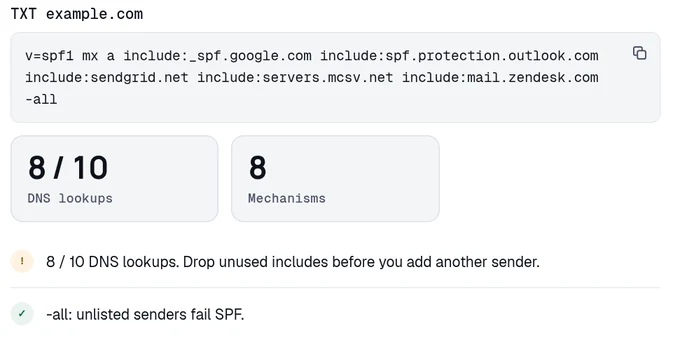
| Term | Lookups | What it's for |
|---|---|---|
| mx | 1 | Inbound mail servers. In this example they don't send outbound mail. |
| a | 1 | The web server, which sends no mail. |
| _spf.google.com | 1 | Google Workspace. It holds only address ranges. |
| spf.protection.outlook.com | 1 | Microsoft 365, left over from a finished migration. |
| sendgrid.net | 2 | SendGrid. It holds one more include, ab.sendgrid.net. |
| servers.mcsv.net | 1 | Mailchimp. |
| mail.zendesk.com | 1 | Zendesk. |
| Total | 8 | Under the limit, with 2 lookups left. |
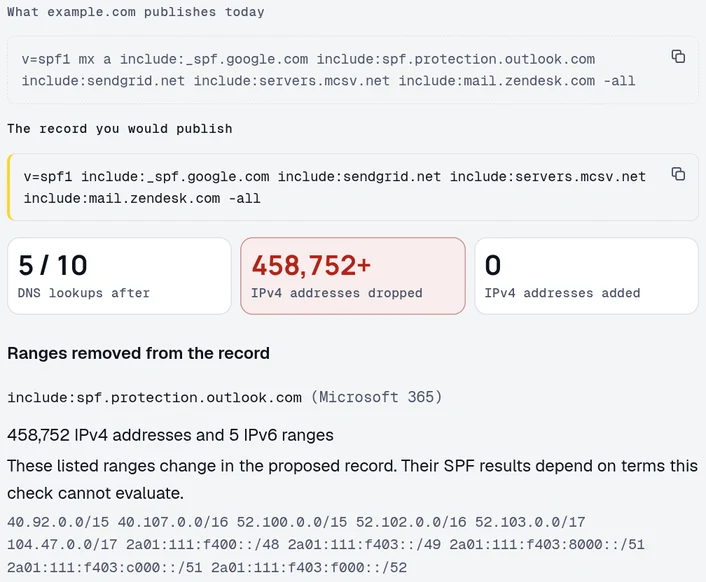
Three terms list servers that send nothing for this domain: mx, a and the Microsoft include. Delete them and the record costs 5 lookups.
The SPF change pre-flight compares the record you publish today with the one you're about to publish. Paste the trimmed record and it shows the count dropping from 8 to 5. The pre-flight also lists every Microsoft 365 range that would stop passing.
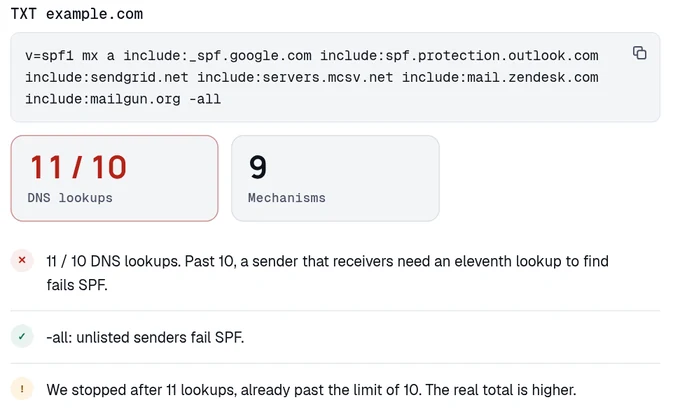
Now add Mailgun's include:mailgun.org to the original record, and the count passes ten. Mailgun's include costs 5 lookups on its own, because it holds four more includes. Our checker stops counting at the eleventh lookup, as a receiver must. The checker shows 11. The full record needs 13.
The fixes in detail
1. Delete the includes you don't need
Deleting a term costs nothing. For each include, check that you still pay for the product behind it. Delete the ones for canceled products, finished migrations and ended trials.
Some includes do nothing even for platforms you still use. SPF checks the envelope sender, the bounce address the platform sets. Many platforms set it to their own domain or to a subdomain of yours, so your main record doesn't need their include. On 24 Oct 2026, Mailchimp's domain authentication steps asked for two DKIM CNAMEs and a DMARC record. They didn't mention an SPF include. When you set up SendGrid's domain authentication, it turns on automated security by default, and that puts its SPF record behind a CNAME on a subdomain of yours.
Mailchimp sets the envelope sender to its own bounce domain, so delete include:servers.mcsv.net. If SendGrid's automated security is on, delete include:sendgrid.net too. The trimmed record then costs 2 lookups. Our provider pages list the include each platform needs and the domain it goes on.
On the Business plan and up, our sending routes check compares every term in your record with 90 days of your own DMARC reports. The check marks each term keep, review or remove.
2. List your own servers as ip4 and ip6 addresses
If you run the server and its address doesn't change, list the address itself. An ip4: or ip6: term costs no lookup and can't fail. Use one for your own relay, an office gateway or a VPS you send from. Keep includes for providers, because they change their addresses on their own schedule.
RFC 7208 gives the same advice in section 10.1.1. For a domain with two mail servers, the RFC's best record lists their addresses as ip4: terms, and its expensive record uses mx:example.com.
3. A sending subdomain per platform
Give each platform that spends several lookups its own sending subdomain. SPF reads the record on the envelope sender's domain, so each subdomain gets its own record and its own ten lookups. In the platform's settings, set the envelope sender to that subdomain. Look for a setting called custom return path, bounce domain or sending domain.
What you publish at the subdomain depends on the platform. Some ask you to publish the SPF record yourself. Mailgun's setup works this way, with include:mailgun.org on a sending subdomain such as mg.example.com. So does SendGrid with automated security turned off.
Others give you a CNAME for the subdomain, and their own DNS answers the SPF query there. SendGrid's automated security, which is on by default, works this way. Publish no TXT record at that name. DNS allows no other record beside a CNAME at the same name (RFC 1034, section 3.6.2).
Your From address can stay on example.com. DMARC uses relaxed alignment unless you set aspf=s, and under relaxed alignment an SPF pass for mg.example.com counts for mail from example.com.
With aspf=s, the envelope domain must match the From domain exactly. Move the From address to the subdomain too, or SPF stops counting toward DMARC for that mail. The DMARC alignment guide shows how to check which mode you're in.
4. Flattening
SPF flattening replaces an include with the IP ranges inside it, written into your record as ip4: and ip6: terms, which cost no lookups. Your record then holds a copy of another company's addresses from the day you copied them. When the provider adds a range, mail from it fails SPF, and nothing in your DNS looks wrong.
If you flatten by hand, flatten only providers whose ranges rarely change, and keep the original include in a note. Compare the copy with the provider's live record on a schedule you'll keep. Watch the size too, since RFC 7208 says the whole DNS answer should fit in 512 bytes (3.4).
Automated flattening services keep the copy current for you. Some do it by editing your DNS, which gives a third party write access to the record that lists who may send as your domain. Others serve the flattened record at their own name, and you publish an include that points at it. To leave that kind of service, you replace the include in your own record. A long list of ranges is split across several records, and each record after the first costs another lookup.
Our hosted SPF, on the Business plan and up, serves the flattened record at our own name. We re-resolve your senders every hour. Your record spends 1 lookup on our include, plus 1 for each further record the ranges fill, up to six records in all. The trimmed record above, flattened from the ranges published on 24 Oct 2026, fills three records and costs 3 lookups.
Counting your lookups
Counting by hand goes wrong, because includes nest and providers edit them. Our SPF checker follows the whole chain and lists every record it read, with its depth. A name at depth 2 is an include inside an include, and it costs a lookup like any other.
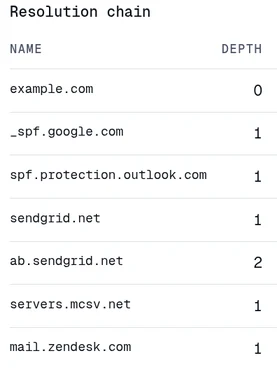
Run the checker after every change. Run it again now and then, because the count moves when a provider edits its own record. To follow a chain by hand, query each name with dig:
On 24 Oct 2026, the record at sendgrid.net held include:ab.sendgrid.net, and the third command reads that nested record.
Void lookups and the other limits
RFC 7208 also limits void lookups, meaning lookups that find no records or a name that doesn't exist (4.6.4). Receivers should allow two and return permerror on the third. Void lookups come from an a or mx term pointing at a name with no address records, or an exists: term that finds nothing.
An include for a canceled service is worse than a void lookup. When the name it points to no longer publishes an SPF record, the include returns permerror for every message that reaches it (5.2). Our SPF checker marks that include as an error and shows "no SPF record" beside the name in the chain.
The mx and ptr terms have caps of their own. An mx term returns permerror past ten address records, and a ptr term ignores everything after the first ten names (4.6.4). Receivers can also stop after a time limit, which RFC 7208 says should be at least 20 seconds, and return temperror.
Why the limit exists
Receivers check SPF while the sending server waits, and every lookup is a DNS query they make for you. Without a cap, a record could turn every receiver that checks it into a source of queries against a victim's DNS. Section 11.1 of RFC 7208 describes that attack.
The cap of ten dates from RFC 4408 in 2006, and RFC 7208 kept it in 2014.
Our DMARC Census looks up SPF for about a million popular domains each month. In the October 2026 edition, 635,855 of those domains published an SPF record, and 17,398 of them (2.7%) needed more than ten lookups.
37,033 of them (5.8%) had at least one of the four permerror causes the scan detects. Those are more than ten lookups, more than one SPF record, an include pointing at a name with no SPF record, and an include or redirect loop. The scan doesn't check for syntax errors, so the real permerror count is higher.
SPF permerror and DKIM
Mail signed with DKIM for your domain keeps passing DMARC through an SPF permerror, because an aligned DKIM pass is enough for DMARC. DKIM has no lookup limit. A DKIM signature usually survives forwarding, and SPF doesn't.
Bulk senders need SPF and DKIM to pass. Google's sender guidelines FAQ defines a bulk sender as one that sends close to 5,000 messages or more a day to personal Gmail accounts. On 24 Oct 2026, the FAQ listed mail that isn't authenticated with both SPF and DKIM as a cause of temporary or permanent failures, or spam foldering.
Fix the record. Then check that every platform in it also signs your mail with your domain's DKIM key. The provider pages list what each one needs. If mail is already bouncing, the SPF permerror error page has the short version.
Point your rua= tag at a mailbox someone reads.
We parse that XML and mail you the senders that used your
domain and whether each one passed. On a paid plan, we also email you the day a new
sender first fails. One free domain, no card.
Count your SPF record's lookups
Every include followed, the total against the limit of ten, and the senders in the record.
Free · No signup · The result names what to change
Questions
What happens at the eleventh lookup?
The receiver stops and SPF returns permerror (RFC 7208, section 4.6.4). The count runs as the receiver reads the record from left to right, so a server matched within the first ten lookups still passes. A sender the receiver needs an eleventh lookup to find gets permerror, and its mail can then pass DMARC only on DKIM.
Does the limit apply per include or across the whole record?
It applies across the whole check. Every include, a, mx, ptr, exists and redirect counts, including the ones nested inside a provider's include. When we checked on 24 Oct 2026, Mailgun's include:mailgun.org cost 5 lookups on its own, because it holds four more includes.
What is SPF flattening?
To flatten a record, you replace an include with the IP ranges inside it, written as ip4: and ip6: terms that cost no lookups. When the provider changes its addresses, your copy is out of date until you or a service refresh it.
Is there a limit on the size of an SPF record?
A single DNS string holds 255 characters. Publish a longer record as several quoted strings, and receivers join them with no space added (RFC 7208, section 3.3). The RFC also says the whole DNS answer should fit in 512 bytes (3.4). Flattened records reach that size quickly. On 24 Oct 2026, Microsoft 365's include alone held 11 ranges.
Keep reading
Checking as you go? The DMARC checker reads the policy you are moving up, the SPF and DKIM checkers show whether your senders will survive it, and the report analyzer reads an aggregate report you already have. No signup.
DomainCanary is a DMARC enforcement service that protects your domain from email spoofing without blocking your own mail.