
An SPF record is one line of text in DNS, and a typo anywhere in it can stop every server you listed from passing. Below, each part of the record gets a valid example checked against RFC 7208, and screenshots show our SPF checker reading a good record and a broken one.
SPF record format
Publish one TXT record on the domain you send from. It starts with v=spf1, lists terms separated by spaces, and usually ends with -all or ~all. The terms in between list your sources of mail: include: for a platform that sends for you, ip4: or ip6: for a server you run yourself.
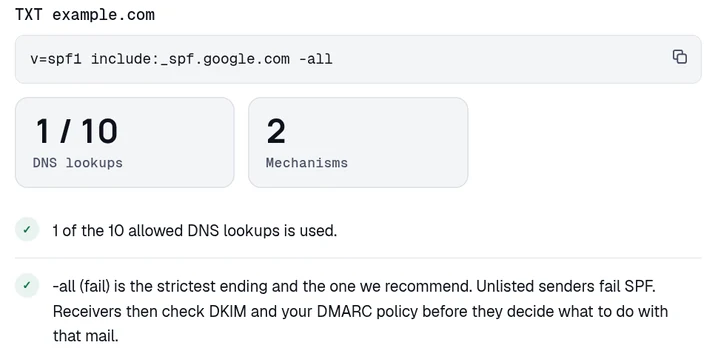
This record lists Google Workspace as the only sender for the domain. With -all at the end, you're telling receivers, the mail servers at Gmail, Outlook and the rest, to fail every other server. Google's own SPF setup page gives the same record ending in ~all and recommends that ending. Google says ~all tells receiving servers to mark mail from an unlisted server as spam.
Our SPF checker reads a domain's record and counts the DNS lookups behind it. On example.com, it finds 1 lookup in that record and passes its ending:
Each rule on this page comes from RFC 7208, the SPF specification, and a number in brackets like (4.5) is the section it comes from.
SPF record examples
Every record in this table is complete and valid. Start from the one closest to your setup and swap in your own platforms and addresses.
| Record | Use it for |
|---|---|
| v=spf1 include:_spf.google.com ~all | Google Workspace, as Google's setup page gives it. |
| v=spf1 include:spf.protection.outlook.com -all | Microsoft 365, as Microsoft's setup page gives it. |
| v=spf1 ip4:203.0.113.7 include:_spf.google.com include:sendgrid.net -all | Google Workspace, SendGrid and a server of your own. The worked example below builds it. |
| v=spf1 a mx -all | Mail sent from your domain's own A record address and from your MX hosts. |
| v=spf1 ip4:198.51.100.0/24 -all | A block of addresses you run yourself. It costs no lookup. |
| v=spf1 -all | A domain that sends no mail at all (10.1.2). |
| v=spf1 redirect=_spf.example.com | Several domains sharing one record that you keep at _spf.example.com (6.1). |
Where the record goes
Publish the record on the exact domain that appears after the @ in the envelope sender (3). SPF never falls back to a parent domain, so news.example.com needs a record of its own and doesn't inherit the one on example.com. Microsoft's SPF setup page says the same: "Each defined domain or subdomain in DNS requires an SPF TXT record, and only one SPF record is allowed per domain or subdomain."
In a DNS panel, the record is a TXT record on the name you send from, and the record goes in the Content box. For the domain itself, Cloudflare's zone apex instructions say to write the name as @, and many other panels take @ or an empty name field. For a subdomain, type its label instead. In the example.com zone, a record for news.example.com goes under the name news, since @ would put it on example.com.
Check the record against these rules before you save it.
- TXT only. SPF had its own DNS record type in its experimental years, and RFC 7208 discontinued it (3.1). If your DNS panel offers a record type called SPF, pick TXT instead.
- Exactly one. When two records at one name both start with
v=spf1, the check returns permerror and receivers read neither of them (4.5). v=spf1comes first. Receivers keep only the records that begin with that exact version string (4.5). A typo there leaves them with no record at all, and the result isnone.- Left to right, first match wins. A receiver tests each term in order, and the first one that matches the connecting server ends the check with that term's qualifier (4.6.2). A term that fails with an error, such as an include whose target has no record, ends the check too, so put
ip4:andip6:terms first. Anything written after anallmechanism is ignored (5.1).
SPF checks the domain in the envelope sender, which the sending server gives in the MAIL FROM command, and it can check the HELO name too (2.3, 2.4). It doesn't check the From: header your recipient sees (11.2). A platform can pass SPF for its own bounce domain while your name sits in the From line, and DMARC alignment exists to catch that.
To see what your DNS is serving right now, ask a resolver:
Qualifiers
Every mechanism can carry a qualifier in front of it, and the qualifier sets the result when that mechanism matches.
| Qualifier | Result | What it means |
|---|---|---|
| + | pass | The server is one of your senders. This is the default when you write no qualifier. |
| - | fail | The server is not one of your senders. |
| ~ | softfail | The server is probably not one of your senders. |
| ? | neutral | You make no statement about the server. |
The qualifier is optional and defaults to +, so mx and +mx are the same term (4.6.2).
DMARC narrows the choice. A message passes DMARC only when SPF or DKIM passes for a domain aligned with its From address (RFC 9989 4.4.2, 5.3.5), so pass is the only SPF result that helps you there. Microsoft's setup page puts the two endings side by side: "DMARC treats -all (hard fail) and ~all (soft fail) as SPF failures. But the DMARC policy is effectively ignored for SPF ~all failures if the messages don't also contain DKIM signatures."
A hard fail can also stop a message before DMARC runs. RFC 9989 7.1 warns that -all "could cause a message to be rejected early in the SMTP transaction, before any DMARC processing takes place". Mail refused that early never appears in your DMARC aggregate reports either.
The ending only matters for servers your record leaves out, since a server you listed passes under either one. Publish ~all while you're still finding your senders, so mail from one you missed isn't refused and still turns up in your reports. Get DKIM signing in place on every platform, then change to -all once the sender list stops changing.
Mechanisms
RFC 7208 defines eight mechanisms. Each one either matches the connecting server or it doesn't, and five of them query DNS (4.6.4).
all
all matches every server, so it goes last as the answer for every server you didn't list (5.1). A domain that sends no mail needs nothing else, and RFC 7208 gives this record for one (10.1.2):
Lookups: 0, because all matches without asking DNS anything.
include:
include:example.net runs the whole check again against another domain's record, and it matches when that second check comes back pass (5.2). Your record uses only the pass or no-pass answer from it. A -all inside the included record doesn't end your check and doesn't make your result a fail, which is why RFC 7208 calls the name "poorly chosen". If the domain after include: has no SPF record at all, your check returns permerror (5.2).
Lookups: 1, and every lookup inside the included record counts against your limit too.
a
a matches when the connecting server's address is one of a domain's A or AAAA addresses (5.3). Written bare, it uses the domain being checked. If that domain's A record points at your web server, the term covers the web server. With a domain after it, it uses that name instead, and a prefix length widens the match to a block of addresses:
Before you keep it, check that the name really sends mail. A bare a on a domain whose A record points at your web server spends a lookup on a machine that may send no mail at all.
Lookups: 1, with or without a domain after the mechanism.
mx
mx matches when the connecting server is one of the MX hosts for a domain (5.4). The syntax mirrors a, so mx:example.com and a prefix length both work:
MX hosts receive your mail, so keep mx only when the same machines also send it. RFC 7208 caps the lookups behind the term: "the evaluation of each MX record MUST NOT result in querying more than 10 address records" (4.6.4). Going over that cap also returns permerror, on top of the limit of 10 for the whole record.
Lookups: 1 against the limit of 10, plus an address lookup for each MX host.
ip4: and ip6:
ip4: and ip6: compare the connecting server's address with the address or block you write after them. Like all, they query no DNS (5.6, 4.6.4).
An ip4: value with no prefix length means /32, and an ip6: value with no prefix length means /128. Write the full address with its prefix. 192.0.2.0/24 is correct and 192.0.2 is a syntax error (5.6). So is a hostname. On 24 Oct 2026, Kitterman's checker answered v=spf1 ip4:mail.example.com -all with PermError SPF Permanent Error: Invalid IP4 address: ip4:mail.example.com.
Lookups: 0, however many addresses and blocks you list.
exists:
exists: builds a domain name, looks it up, and matches if any A record comes back (5.7). Receivers never compare the address it returns with the connecting server. Only whether a record exists counts. With macros, you can use it to allow mail per user or per sending address:
Lookups: 1, and a macro inside the name makes that lookup different for each message.
ptr
RFC 7208 titles section 5.5 "ptr" (do not use) and says the mechanism SHOULD NOT be published. The note in that section says it's slow and puts a large burden on the .arpa name servers. It's also less reliable than the other mechanisms when DNS has errors. Receivers still have to support it, so a ptr in your record still costs a lookup. Delete it.
Lookups: 1 against the limit for the reverse lookup. Each name it returns adds an address lookup on top.
Modifiers: redirect and exp
A modifier is a name and a value joined by =. It carries information and never matches a server (4.6.3). RFC 7208 defines two, and either one appearing twice in a record returns permerror (6).
redirect=example.net hands the check over to another domain's record once none of your mechanisms have matched (6.1). An include: only asks whether that record returns pass, and the check carries on when it doesn't. A redirect= makes the other record's result your result, including its all. If the target has no SPF record, the result is permerror rather than none. Receivers ignore redirect= whenever your record also contains an all mechanism, wherever that mechanism sits (5.1).
Lookups: 1, before the record at the far end spends anything of its own.
RFC 7208 6.1 shows redirect= used for several domains that share one record:
Gmail's own domain works this way. On 24 Oct 2026, dig +short TXT gmail.com returned v=spf1 redirect=_spf.google.com among its TXT records.
exp= points at a TXT record holding a sentence a receiver may quote back when your record fails a message (6.2). That lookup happens after the fail rather than during the check, so it doesn't count against your limit (4.6.4).
Receivers must ignore modifiers they don't recognize (6). That's why the include= typo in the mistakes list below raises no error.
Macros
A macro is a %{ } sequence inside a term, and the receiver replaces it with a value from the message it's checking (7). If you send through a mailbox provider and a few platforms, you won't need any of them.
| Macro | Becomes |
|---|---|
| %{s} | The envelope sender, as in someuser@example.com. |
| %{l} | The local part of the sender, the part before the @. |
| %{o} | The domain of the sender. |
| %{d} | The domain being checked, which changes inside an include. |
| %{i} | The connecting server's IP address. |
| %{v} | in-addr for an IPv4 address, ip6 for an IPv6 one. |
| %{h} | The HELO or EHLO name the server gave. |
| %{p} | The server's validated hostname. RFC 7208 marks it "do not use". |
Three more, %{c}, %{r} and %{t}, work only inside the exp= text (7.2). A digit after the letter keeps that many parts from the right, and an r reverses the parts, so %{ir} turns 192.0.2.1 into 1.2.0.192 (7.3). A % that isn't followed by {, %, - or _ is a syntax error.
Take the exists: record above, with mail from someuser@example.com sent from 192.0.2.1. RFC 7208 5.7 gives the name looked up as 1.2.0.192.someuser._spf.example.com.
Record length and letter case
A DNS character-string holds at most 255 octets. Publish a longer value as several strings, and receivers join them with nothing added, so "v=spf1 inc" "lude:example.net -all" reads as one record (3.3). Some DNS panels split a long value for you and others refuse one over 255 characters. Check with dig after you save, either way.
RFC 7208 says the whole answer should fit in 512 octets and gives 450 octets as the working figure, counting every TXT record at the name (3.4). On 24 Oct 2026, sendgrid.net served 11 other TXT strings beside its SPF record. The answer from 1.1.1.1 came to 824 octets. You'll hit the 10-lookup limit long before your own record reaches 450 octets.
Under RFC 7208's grammar, every quoted string is case-insensitive, v=spf1 included, so V=SPF1 MX -ALL is a valid record (4.6.1, 12). Domain names are case-insensitive too. Publish everything in lowercase anyway, because some checkers refuse an uppercase version. On 24 Oct 2026, Kitterman's checker answered V=SPF1 MX -ALL with "SPF records must start with v=spf1, this does not appear to be a valid SPF record".
SPF results
An SPF check returns one of seven results about the connecting server (2.6), and only pass helps DMARC.
- none. The receiver found no record, or nothing at that name started with
v=spf1. You've given it no statement to apply. - neutral. Your record makes no statement about the server. Receivers must treat it exactly like none (8.2).
- pass. The server is one of your senders. This is the only result DMARC can use (RFC 9989 4.4.2).
- fail. The server is not one of your senders. A receiver that rejects here should answer
550 5.7.1(8.4). - softfail. The server is probably not one of your senders. Receivers should not reject on this alone (8.5).
- temperror. A DNS error interrupted the check. A receiver that rejects for it should answer
451 4.4.3, and a retry may succeed with no change from you (8.6). - permerror. The receiver couldn't interpret the record. A receiver that rejects for it should answer
550 5.5.2, and it stays broken until somebody edits DNS (8.7). The SPF permerror page covers what to do.
The 10-lookup limit
include, a, mx, ptr, exists and redirect= each query DNS during the check. all, ip4:, ip6: and exp= don't (4.6.4). Receivers count those querying terms across the whole check, including everything nested inside every include. Past 10, the check returns permerror rather than a partial answer.
Receivers should also stop after two lookups that come back empty and return permerror (4.6.4). The 10-lookup guide counts a real record term by term and covers the ways to get back under the limit.
Mistakes that break a record
Check the record you're about to save against this list. Each mistake takes a DNS edit to fix and then a TTL to clear.
A second record next to the first. Two
v=spf1records at one name return permerror (4.5). To add a platform, edit the record you have. In our October 2026 scan of the Tranco top million, 9,942 domains published more than one SPF record.-
include=instead ofinclude:. A term with=in it is a modifier, and receivers ignore modifiers they don't recognize (6). Sov=spf1 include=spf.protection.outlook.com -allraises no error and works likev=spf1 -all. On 24 Oct 2026, Kitterman's checker passed it as valid syntax, then answeredFAIL Message may be rejectedfor a server at 198.51.100.7. Microsoft's common syntax errors table lists the same typo. Our SPF checker marks the term as an error: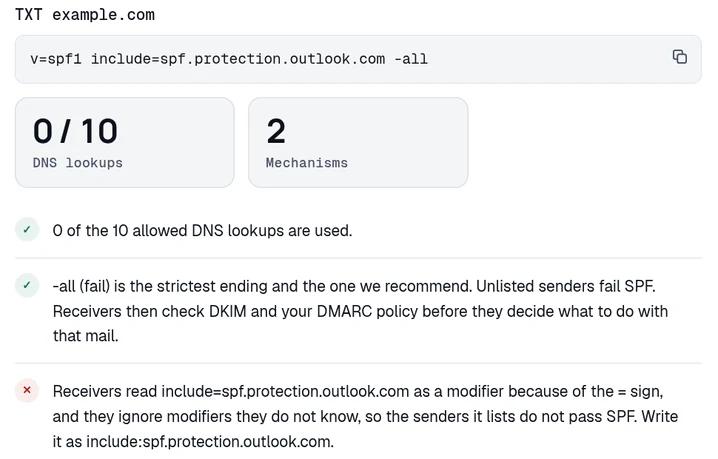
The lookup count is 0, because receivers skip the include= term without resolving it. A space after the colon.
include: spf.protection.outlook.comsplits into two broken terms. On 24 Oct 2026, Kitterman's checker answeredPermError SPF Permanent Error: empty domain:: include:, with the doubled colon and a trailing space of its own.A hostname where an address belongs.
ip4:andip6:take addresses and blocks only (5.6). Usea:for a name.A bare
allor a+allending. The qualifier defaults to+, and RFC 7208 A.1 spells out whatv=spf1 +allmeans: "any <ip> passes". Anyone on the internet can then send as your domain. In the same October scan, 387 of the domains with a working SPF record ended it this way.A record with no ending. A record with neither an
allnor aredirect=finishes neutral, as though?allwere written there (4.7). Receivers treat neutral exactly like a missing record (8.2), so end the record with~allor-all. A record that ends inredirect=is already finished, because the target record's ending applies (6.1). Adding anallto it would switch the redirect off (5.1).Something in front of
v=spf1. The version has to open the record, or receivers discard it and the result is none (4.5).A record type called SPF. RFC 7208 discontinued the SPF record type (3.1). Publish TXT.
A trailing period after an include domain. Microsoft's table lists
include:spf.protection.outlook.com.as an error, and Kitterman's checker accepted the same record on 24 Oct 2026. RFC 7208 says receivers must accept a trailing dot and you shouldn't publish one, because some older implementations refuse it (7.3). Drop the dot.
Google Workspace and SendGrid in one record
Say your staff use Google Workspace and your app sends through SendGrid. You also run a mail server of your own.
Start with each server you run yourself, as an
ip4:orip6:term. An address costs no lookup, and nobody can renumber it without you knowing. Placed first, the term passes your own server even when a platform's include can't be resolved.Add the include for your mailbox provider. Google's setup page gives
include:_spf.google.com.Add the include for each platform. SendGrid's SPF documentation gives
v=spf1 include:sendgrid.net -all, and the include is the part you take.End with
~allor-all, depending on how sure you are of the list.
All of it goes in one record, because a receiver that finds two records returns permerror for both.
Our SPF record generator builds the same terms. Tick Google Workspace and SendGrid, open the section under the button, put your address in the IPv4 box, and pick the -all ending:
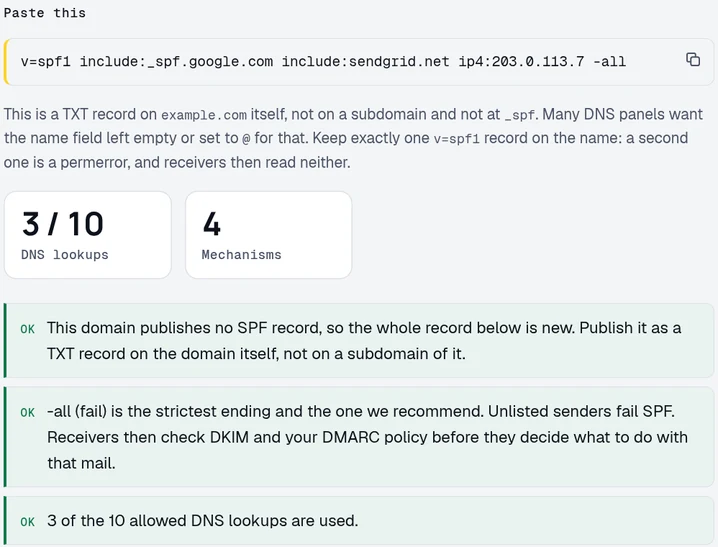
The generator puts the ip4: term after the includes. Move it to the front before you publish, so your own server passes even when an include fails.
Then count the lookups. The ip4: term is free. Against 8.8.8.8 and 1.1.1.1 on 24 Oct 2026, the two includes cost 3 lookups between them. _spf.google.com cost 1, because its record held only ip4: and ip6: terms. sendgrid.net cost 2, because its record includes ab.sendgrid.net.
The SPF checker finds the same 3 lookups. Its resolution chain lists each record it fetched and how many includes deep it sits:
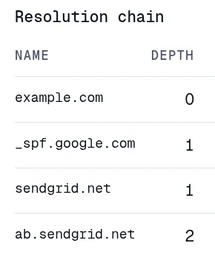
Older counts put _spf.google.com at 4, from when it included three _netblocks records. All three still resolve on their own, and the parent record no longer includes them. Any lookup count you read, on this page or anyone else's, is a measurement from the day somebody resolved the chain. Resolve it yourself before you save the record.
Syntax checkers
Each of these free tools answers a question to ask before you save the record. None of them needs an account.
- Is the syntax valid? Kitterman's SPF record check runs a record you haven't published yet through pySPF, the Python SPF library. It comes from Kitterman Technical Services, the company RFC 7208 lists for its author, Scott Kitterman. Kitterman's page says the check doesn't support macros other than
%{d}. - What does the syntax mean? open-spf.org's syntax page holds the community reference, and RFC 7208 itself reads better than its reputation suggests.
- How many lookups does it cost? Our SPF checker resolves the whole include chain against live DNS and totals it against the limit of 10.
Missing senders
A record can follow every rule on this page and still break mail, because none of those tools can see which servers send as you. It can leave out the invoicing app a contractor connected, or the helpdesk that started mailing customers last quarter. Under -all, receivers fail those servers.
DMARC aggregate reports list every source that sent as your domain and say whether SPF and DKIM passed. Each receiver that sends them writes an XML file a day. You turn them on with a rua= tag on your DMARC record, and the DMARC setup guide has the record. Cloudflare's DMARC Management charts each sending source with its SPF and DKIM results, on any Cloudflare plan, for a domain whose DNS is on Cloudflare. Postmark's free DMARC tool emails a weekly summary for any domain. When I last checked, on 24 Oct 2026, it listed the top 10 sources with 5 IP addresses each. It kept 7 days of history, and the paid version cost $14 a month per domain.
We built DomainCanary to read those reports for you. We take the XML from every receiver that sends it, and every Monday we email you each source and whether it passed. The Starter plan is $19 a month for 3 domains. On it and the plans above it, we also email you on the day a new source fails DMARC or a sender that was passing stops. Once every real sender shows up passing, you change one character, from ~all to -all. Get the weekly digest, free for your first domain.
Count your SPF record's lookups
Every include followed, the total against the limit of ten, and the senders in the record.
Free · No signup · The result names what to change
Questions
Can a domain have two SPF records?
No. When a receiver finds more than one TXT record starting with v=spf1 at the same name, SPF returns permerror and stops. Nothing in either record passes, and the domain stays broken until somebody merges the two into one. RFC 7208 section 4.5 defines that. To add a second sending platform, edit the record you already have. The guide on multiple SPF records covers how to spot two and how to merge them.
What is the difference between -all and ~all at the end of an SPF record?
With -all, a server that your record doesn't list gets a fail. With ~all it gets a softfail, and RFC 7208 says receivers shouldn't reject a message on a softfail alone. DMARC counts both as SPF failures, because only an SPF pass helps a message pass DMARC. Use ~all while you're still finding your senders, then change it to -all.
What does v=spf1 a mx -all mean?
It passes mail from the addresses in your domain's own A and AAAA records, which on most domains belong to the web server, and from the hosts in your MX records. Every other server fails. Each term costs a DNS lookup. Keep them only if those machines really send your outbound mail.
Does the order of mechanisms in an SPF record matter?
Yes. A receiver tests terms from left to right and stops at the first one that matches or fails with an error. In v=spf1 ip4:192.0.2.7 include:missing.example -all, a server at 192.0.2.7 passes before the broken include is reached. Swap the first two terms and every message gets permerror. Put ip4: and ip6: terms first, because they cost no lookup and can't fail. Put all last, since nothing after it is tested.
How long can an SPF record be?
A single DNS string holds 255 characters. Publish a longer record as several strings, and receivers join them with no space added. RFC 7208 also says the whole DNS answer should fit in 512 octets. In practice the 10-lookup limit stops a record long before its length does.
Keep reading
Checking as you go? The DMARC checker reads the policy you are moving up, the SPF and DKIM checkers show whether your senders will survive it, and the report analyzer reads an aggregate report you already have. No signup.
DomainCanary is a DMARC enforcement service that protects your domain from email spoofing without blocking your own mail.