
A new provider asks you to add include:their-domain.com to your SPF record, and adding a second TXT record beside the old one looks like the careful way to do it. Every DNS panel lets you save that second record, and from then on neither record works.
Two records on one name
Two SPF records on one name return permerror for both. The receiving server, at Gmail, Outlook or wherever you sent to, fetches the TXT records at your domain and keeps the ones starting with v=spf1. RFC 7208 section 4.5 says that if more than one comes back, the check returns permerror and stops. The receiver doesn't merge them and it doesn't pick one. It couldn't pick anyway, since DNS returns the two in whatever order it likes.
In a DNS panel the mistake looks like two ordinary rows. This is Cloudflare's record list for a test name of ours, after a SendGrid record was added beside a Google Workspace record:

The sender you just added doesn't pass, and neither does any sender that passed yesterday:
Merging the records
-
Find every SPF record on the name. Query it from a terminal, or run the name through the SPF checker:
dig +short TXT example.com | grep v=spf1Two lines back means two records, and the SPF checker reports the permerror at the top of its findings:

Write the merged record. Take every mechanism from both records, drop the duplicates, and end with a single
all:example.com. TXT "v=spf1 include:_spf.google.com include:sendgrid.net ~all"Check its lookup count before you publish it. Each old record had its own ten lookups, and the merged record has ten for both. Paste the merged record into the pre-flight to count the lookups it really costs. The pre-flight also lists any sender that passed under the old records and wouldn't under the new one.
-
Edit one of the old records so its content is the merged record, then delete the other. Editing keeps an SPF record on the name the whole time.

The Google record edited to hold both includes. The SendGrid record is deleted next. -
Check the name again once the change is live. You should see a single record and no permerror:
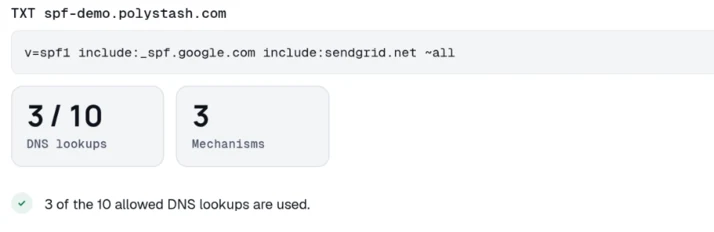
Resolvers keep the old answer until its TTL runs out, often five minutes and sometimes an hour. A check that still shows two records right after the edit is usually reading that cached answer.
The order of include: and ip4: terms makes no difference to the result.
If one record said -all and the other ~all, the merged record gets one of them. Pick ~all until you're sure the sender list is complete. Going to -all on a record that's missing a sender turns that sender's mail into bounces.
Two records at six lookups each merge into one at twelve, which is a permerror for a different reason. The 10-lookup limit guide covers getting back under it. A DNS panel can't count lookups for you, because there's nothing to read until you publish.
Mail after a permerror
Most receivers accept a message after a permerror, so nothing bounces and nobody notices. RFC 7208 leaves it to the receiver what to do with the result. On the day you add the second record, mail still arrives and the DNS panel shows nothing wrong.
What you've lost is the SPF pass. DMARC needs SPF or DKIM to pass and align. After a permerror, no sender in either record gets an SPF pass. Under p=none that only shows up in your aggregate reports. Under p=reject, every message without a valid DKIM signature starts bouncing. The first bounces come from tools that never signed anything, like the invoicing app or the contact form on the website.
Subdomains
Each subdomain gets its own record, because different names get different records. A subdomain doesn't inherit its parent's SPF, so a domain sending from example.com and mail.example.com publishes a record at each name. That's two records on two names, and it's correct:
A subdomain also helps when a bulk sender pushes your main record past ten lookups. Give the bulk sender a subdomain with its own record, and your main domain's lookups stay where they were. Mail from the subdomain aligns to the subdomain, which DMARC accepts under relaxed alignment and rejects under strict.
Once the merged record is live, check that it lists every server that sends as you. DMARC aggregate reports list the sources that actually sent mail as your domain. We read those reports and send you a weekly digest of what's in them, free for your first domain.
Count your SPF record's lookups
Every include followed, the total against the limit of ten, and the senders in the record.
Free · No signup · The result names what to change
Questions
Can I have two SPF records if they are for different subdomains?
Yes. The limit is one record per name. example.com and mail.example.com are different names, so each gets its own record and neither inherits the other's. The failure is two records on the same name.
I added a second record and mail still works. Is it fine?
No. Most receivers accept the message after a permerror, so nothing bounces. What you've lost is the SPF pass. DMARC now sees no SPF pass from any sender in either record, so every message has to pass on DKIM alone. Under p=reject, anything unsigned starts bouncing.
Which record wins if I have two?
Neither. RFC 7208 section 4.5 says that finding more than one v=spf1 record returns permerror and stops there, so every server named in either record loses its pass.
Does a second TXT record break SPF even if it is not an SPF record?
No. A domain carries plenty of TXT records at the same name, like verification strings and site ownership tokens. A receiver only reads the ones that start with v=spf1. Two of those is a permerror.
Keep reading
Checking as you go? The DMARC checker reads the policy you are moving up, the SPF and DKIM checkers show whether your senders will survive it, and the report analyzer reads an aggregate report you already have. No signup.
DomainCanary is a DMARC enforcement service that protects your domain from email spoofing without blocking your own mail.